
Lindy alternatives for teams
Lindy or AgentLed?
Choose by operating model.
Lindy and AgentLed both support AI workflows for teams, but they organize the work differently. Lindy centers assistants, automations, and broad app integrations. AgentLed centers managed business agents, client-isolated context, approval gates, and execution oversight.
Which Lindy alternative is best for a team?
Choose Lindy when you want an assistant-led experience for inbox, meetings, calendar, follow-ups, and general automations. Choose AgentLed when the work must run as a supervised business process with persistent company context, explicit approvals, execution history, and repeatable delivery across teams or clients.
The core difference
Lindy
AI assistant and workflow builder
Lindy combines assistants, an agent builder, Autopilot, hundreds of integrations, knowledge bases, and team workspaces. Its product experience starts from delegating work to an assistant.
AgentLed
Managed business-agent operations
AgentLed organizes work around company or client workspaces, supervised agents, reusable routines, business context, approval gates, and a reviewable execution history.
At a glance
| Capability | AgentLed | Lindy |
|---|---|---|
| Operating model | Managed business agents and repeatable delivery workflows | Assistant-led automations and general-purpose agent workflows |
| Team collaboration | Company and client workspaces with shared agents, routines, and review | Personal and team workspaces; team settings are part of Enterprise |
| Knowledge and memory | Structured business context tied to entities, outcomes, and execution history | Knowledge bases, semantic or keyword search, and assistant memory |
| Developer access | Documented native MCP server for Claude Code, Cursor, Codex, and other clients | Agent Builder, actions, integrations, and APIs in Lindy's product ecosystem |
Full feature comparison
| Feature | AgentLed | Lindy |
|---|---|---|
| Best fit | Supervised business processes that must be repeatable, reviewable, and context-aware | AI assistance for inbox, meetings, calendar, follow-ups, and general workflows |
| Team collaboration | Shared company or client workspaces with agents, routines, roles, and review queues | Personal and team workspaces; Enterprise adds team administration and controls |
| Memory and context | Business context tied to entities, relationships, accepted outcomes, and execution history | Knowledge bases and memory with file, website, Drive, and Notion sources |
| Model choice | Model routing and step configuration based on task, policy, cost, and latency | Model selection is available on actions through model labels |
| MCP access | Documented native MCP server for triggering and inspecting work from MCP clients | Official product materials emphasize Lindy's builder, actions, integrations, and APIs |
| Client delivery | Client-isolated workspaces and branded subdomains for managed delivery | Personal and team workspaces inside the Lindy product |
| Workflow Creation | Build reusable routines and agents around a business goal, data, review, and delivery | Build agents and automations with natural language, actions, and templates |
| Human-in-the-Loop | Explicit approval gates and review-only execution before consequential actions | Review and confirmation controls within assistant and workflow runs |
| Execution operations | Execution timelines, review queues, outcome feedback, and reusable operational context | Assistant run history and workflow management inside Lindy |
| Enterprise controls | Workspace roles, isolation, approvals, and execution-level auditability | Enterprise team settings include SSO, SCIM, and audit logs |
When Lindy is the better fit
Lindy supports individual and team use with team workspaces, knowledge bases, an agent builder, Autopilot, and hundreds of integrations. It is a strong choice when the assistant experience is the center of the product decision.
- •You want one assistant for inbox, meetings, calendar, follow-ups, and general work
- •You value a broad integration catalog and cloud-computer actions
- •Your team wants to build agents directly in Lindy's interface
- •Lindy's personal or Enterprise packaging matches your collaboration and administration needs
When AgentLed is the better fit
The outcome is an operational process
Use AgentLed when research, generation, review, and delivery must run as one repeatable routine instead of a collection of assistant tasks.
Context must survive across runs
AgentLed keeps business entities, relationships, evidence, human decisions, and execution outcomes together so the next run starts with reviewed context.
External actions require explicit review
Approval gates and review-only modes keep sends, publishing, and other consequential actions under team control.
You deliver the same capability across clients
Client-isolated workspaces, reusable agents, and branded subdomains support a managed-service operating model without mixing customer context.
Your IDE is part of the operating surface
AgentLed's documented MCP server lets Claude Code, Cursor, Codex, and other MCP clients trigger and inspect workflows.
Native MCP server
AgentLed publishes a native MCP server for triggering, inspecting, and managing workflows from compatible AI tools. Lindy's official product documentation centers its own Agent Builder, actions, integrations, and APIs, so compare this developer surface directly if MCP is a requirement.
npx -y @agentled/mcp-server
Works with Claude Code, Cursor, Codex, Windsurf, and any MCP-compatible client.
Product evidence
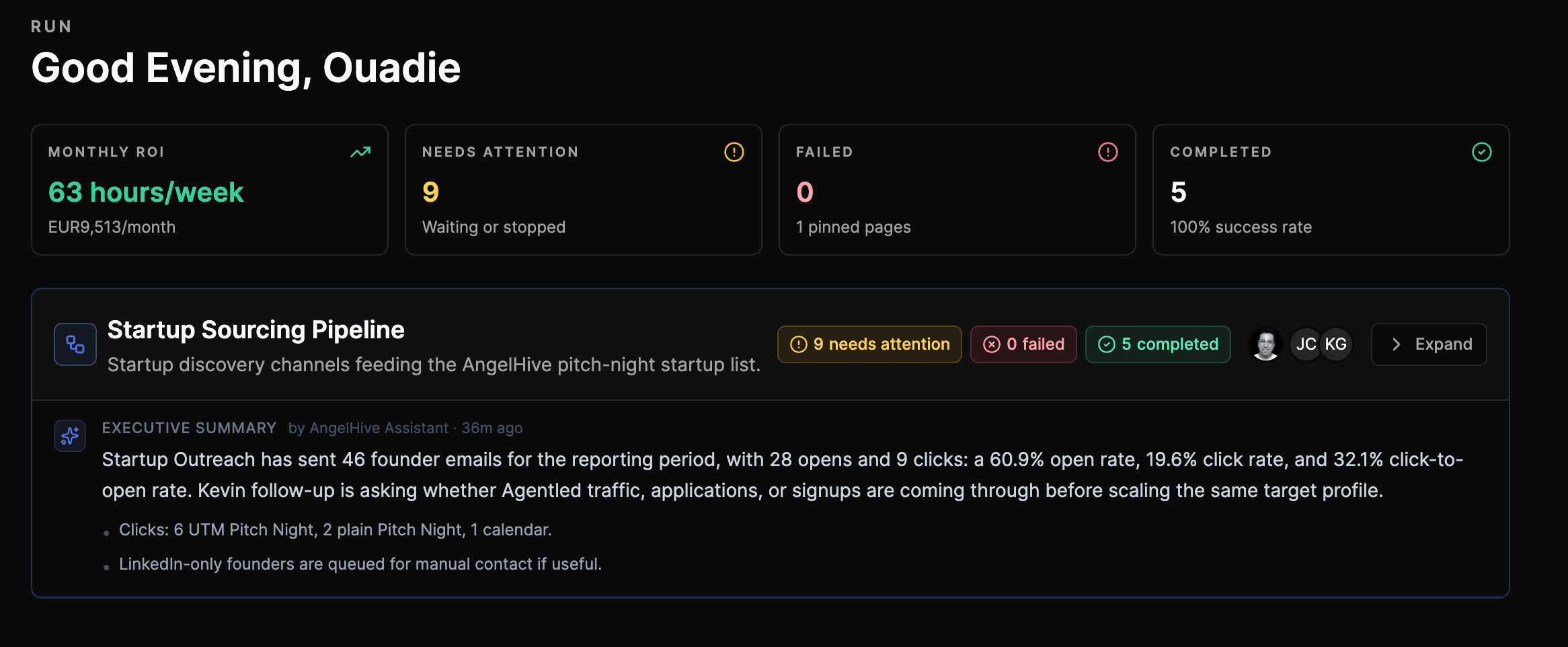
A real supervised AgentLed workspace
This customer workspace shows execution health, work waiting for review, completed runs, and ROI reporting in the same operating view.
Comparison claims are reviewed against current public product documentation and hands-on AgentLed product use. Pricing and packaging can change; verify them with each vendor before purchasing.
Reviewed by Ouadie BOUSSAID ·
Sources and review date
Lindy capabilities were checked against its official Workspaces, Knowledge Base, pricing, and changelog pages on July 28, 2026. Packaging can change, so verify current details before buying.
Test the operating model, not the feature checklist
Bring one real process with context, a review step, and a measurable output. Run it in AgentLed, compare the team experience with Lindy, and choose the system your operators can supervise confidently.